
Custom software development

Your business has its own way of working. We build the software it needs.

Apps to coordinate teams, portals to manage orders and websites to handle bookings or enquiries.

  • Agreed scope
  • Deliveries you can test
  • Integration review

Business applications

What we can build for your business

We design each solution around how your team works, with the access and integrations it needs.

Coordinate teams

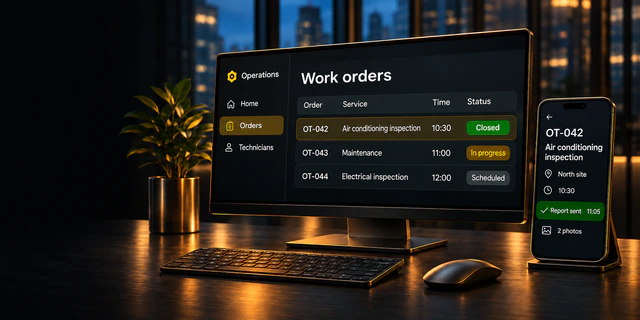
Work orders, visits and field reports.

Manage orders

Customer portals with account pricing, catalogues and order history.

Take bookings

Booking and enquiry websites with schedules by location.

Extend your software

New features and integrations with your tools.

Illustrative examples

How it could work in your business

Examples use fictional data.

Choose an example

Work order

OT-042Job closed

Air conditioning inspection

North Site ·

Report awaiting review

Technician’s report2 photos attached

Close-up of the outdoor air conditioning unitPressure gauge and copper connections on the equipment
Office dashboard

My work orders

OT-042

Air conditioning inspection

North Site ·

Report sent

2 photos attached

Report completedAwaiting review

Technician’s app

What your business gains

  • Reports and photos in one work order
  • Fewer follow-up calls
  1. Office assigns the visit
  2. Technician submits the report
  3. Office reviews

What we’d validate in the first version
  • Time to receive the report
  • Share of complete reports
  • Follow-up calls per work order

Order portal

Account A

F-24 industrial filter

89 €

Account B

F-24 industrial filter

79 €

Order for Account B79 €

What your business gains

  • Each customer sees their own price
  • The applied price stays on the order
  1. Customer signs in
  2. Portal applies account pricing
  3. The team receives the order

What we’d validate in the first version

  • Orders with correct account pricing
  • Price corrections
  • Processing time

Schedule by location

Before confirmation

North Site ·

Last slot

After confirmation

North Site ·

Booked

The time is removed from availability once the booking is confirmed.

What your business gains

  • Up-to-date availability by location
  • Less manual work to confirm appointments
  1. Customer picks a location and time
  2. System confirms the booking
  3. The team sees the updated schedule

What we’d validate in the first version

  • Availability updated at confirmation
  • Double bookings detected
  • Manual actions per appointment
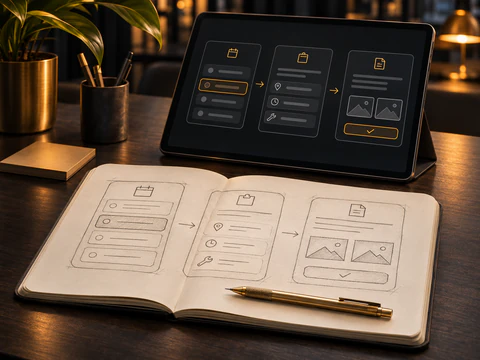
Notebook with screen sketches and a tablet showing the workflow prototype

Design and delivery

What we agree and what we deliver

We agree what the first version needs to do, review a prototype with you and test the workflows before launch.

  1. Scope

    Agreed workflow and criteria.

  2. Prototype

    Screens to review together.

  3. Build

    A version you can test.

  4. Launch

    Access, documentation and support.

The proposal sets out what will be delivered and the support agreed for after launch.

What each phase includes
Scope
We identify who will use the software, the task they need to complete and any integrations. We document the acceptance criteria.
Prototype
We walk through the usual journey and cases such as missing required information before building.
Build
Your team tries the version with business use cases and we review what needs to be adjusted.
Launch
We prepare the configuration, hand over the agreed access and document how to run the software and request support.

Define the scope

Plan your first version

Choose a workflow, who will use it and which tool it should connect to. See what to build first and what needs to be validated.

Plan your first version

Suggested first version

  • Assign a visit
  • Submit report and photos
  • Review the work

The office assigns visits and each technician submits a report.

To validate Connection to the existing calendar

You can read this example and use the contact details to tell us about your project.

Handover and support

What your team takes forward

  • Agreed access
  • Code and data
  • Documentation
  • Support
Can we start with a first version?

Yes. We choose a workflow, agree who will use it and define what it needs to do. Your team tries it before deciding what to add.

How is the budget set?

We review scope, integrations and launch requirements. The proposal sets out what you’ll receive and which costs cover licences or support.

Can it integrate with my tools?

We check what data can be shared, the permissions needed and the available connection options. We then agree how the integration will work.

How are code and data handed over?

The proposal sets out access to code and data, handover documentation and support terms. We agree these before building.

What would you like your customers or team to be able to do?

Tell us how you work today and what you’d like to achieve.

gestion@plusultradevs.com+34 641 894 664

Describe what you need without including passwords, confidential documents or other people’s personal data.

Optional details

If the form does not become available, please email or call us. gestion@plusultradevs.com · +34 641 894 664